

Version 2020/10
Custom tabs have been documented here. The new fade-functions allow fading out or fading in custom tabs. Of course they can be used conditionally, for example fade out a certain tab under certain conditions.
Custom Tab "Meta"
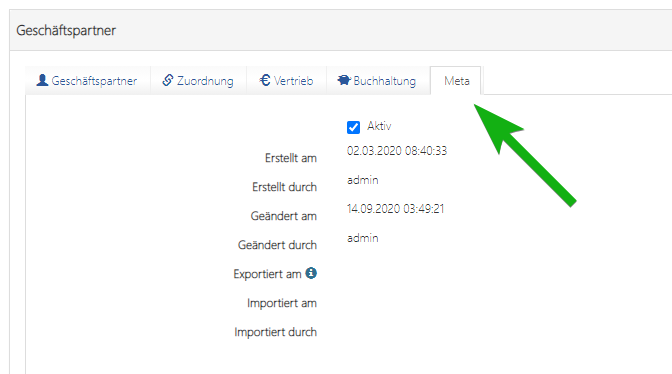
Code
// file: hooks/TABLENAME-dv.js
var dv = AppGiniHelper.DV;
dv.addTab("tabContact", "Ansprechpartner", "user", ["label", "first_name", "middle_names", "..."]);
dv.addTab("tabAssignment", "Zuordnung", "link", ["partner_id", "position", "memberID"]);
var tabMeta = dv.addTab("tabMeta", "Meta", null, ["created_on", "created_by"]);

tabMeta.fadeOut();

Fade Out
tab1.fadeOut();
tab1.fade(false);
Fade In
tab1.fadeIn();
tab1.fade(true);
See also
Pro-Tip
Use fadeOut (or hide) in combination with getMemberID() for hiding tabs depending on the currently logged in user:
// file: hooks/TABLENAME-dv.js
var dv = AppGiniHelper.DV;
var tabMeta = dv.addTab("tabMeta", "Meta", null, ["created_on", "created_by", "modified_on", "modified_by"]);
// ... add more tabs here

AppGiniHelper.getMemberID(function(memberID) {
    if (memberID !== 'admin') {
        tabMeta.fadeOut();
    }
});
in Line 6 we ask AppGiniHelper class to request the memberID (username of currently logged in user) from the server and execute a function. As soon as AppGiniHelper got a response, it calls the function and passes the memberID as first (and only) argument.
In Line 7 we check if the username equals admin or not. If not admin, in Line 8 we fadeOut tabMeta.
Do you like it?
We can only get better if you give us constructive suggestions for improvement. Just voting "No" without giving reasons or suggestions is not helpful and cannot lead to changes.
If you have been searching for a completely different solution than the subject says, this article can not be and will not be helpful for you. In these cases you should consider not to vote.
This is website feedback, only. This voting is not a support form nor ticket system.