

Please note that all changes including syntax and usage examples can be seen in changelog.txt which is part of your download.
Table of Contents
2022/11
Changelog and whole documentation is moving to another site.
Please update your bookmarks.
Bugfixes Work in Progress
New Features Work in Progress
2021/07
Released July 29th, 2021
Detail View
- NEW: hide labels programmatically
dv.getFields(["field1", "field2", "..."]).hideLabels(); - EXPERIMENTAL: lock
<input/>(!) fields programmaticallydv.getField("inputfield").lock(true) // true|false
This function protects the field against overwriting and appends a button for unlocking the field.
Limitation: This will only work in real<input/>fields, not on complex fields (like date-selectors or lookups).

Custom tabs
- FIX: readonly (!) images will be moved into custom tabs correctly, now
- NEW: add badge to
childrencustom tab programmaticallytab.addBadge(123); // numbertab.addBadgeIf(condition, number); // condition: boolean, number: numeric
Children tabs
- NEW: Re-Label children tab caption
var tabs = dv.getChildrenTabs();var tab = tabs.get("tablename");var tab.label("New Tab Caption"); - NEW: add buttons and links to child tab
tab.addButtontab.addButtonModaltab.addButtonOpentab.addButtonOpenModaltab.addLinktab.addLinkModal - NEW: remove default "open child in modal dialog" button in rows of a child tab
dv.getChildrenTabs().get("tn", "cn").removeButtons(); - NEW: change image size in children tab captions
dv.getChildrenTabs().setImageSize(16); - EXPERIMENTAL: change order of children tabs programmatically
dv.getChildrenTabs().sort( ["tablename1", "tablename2", "..."], true, true );
parameters:
(1) array of table names
(2) boolean: auto activate first tab
(3) boolean: auto hide tabs on load, then auto-show tabs after sorting - NEW: hide/show tabs programmatically
dv.getChildrenTabs().hideTabs();dv.getChildrenTabs().showTabs(); - NEW: decrease padding (text-margin) in tab captions which so more tabs will fit into one row
dv.getChildrenTabs().compact(5);
Children links
- NEW: hide toolbar containing links to child tables
dv.getChildrenLinks().hide(); - NEW: remove horizontal line
dv.getChildrenLinks().removeHR();
Table View
- EXT: tv.addButton callback function receives 2nd argument "data" (object) which contains all values of that specific row
tv.addButton(function (id, data) { }, "icon", "text", Variation.default); - EXPERIMENTAL:
tv.addButton()5th parameter can be used to customize the tv-button per rowtv.addButton(
function (id, data) { /* your callback function*/ },"shopping-cart", "Kaufoptionen", Variation.default,function (id, options) {
options.text = "text"; // custom text for this rowoptions.icon = "cog"; // custom icon for this rowoptions.variation = Variation.primary; // custom variation for this rowoptions.skip = false; // if skip=true the button will NOT be rendered}) - EXPERIMENTAL: remove column sorting programmatically
tv.noSort("column");
Common
- NEW: change browser title (browser-tab caption)
AppGiniHelper.common.setBrowserTitle("text");
You can even pass a function for changing the title dynamicallyAppGiniHelper.common.setBrowserTitle(function(title) { return "new title"; }); - NEW: Get logged in memberID on client side
AppGiniHelper.getMemberID(function(memberID) { /* your function */ }); - NEW: User translations (defined in
language.php) on client sidevar text = AppGiniCommon.T["key"]; - UPD: additional parameter for autoRedirect function
common.autoRedirect(true);
By passingtruethe auto redirect function will also work if we have a referrer, for example when navigating between an unrestricted page and a restricted page, not only when opening up a new broser tab. For backward compatibility, the default value isfalse.
Navbar
- NEW: Disable keyboard shortcuts programmically
common.navbar.enableShortcuts(true|false); - NEW: Hide user profile link
common.navbar.hideUserProfileButton(); - NEW: hide logout button
common.navbar.hideLogoutButton(); - NEW: hide keyboard-shortcuts link
common.navbar.hideKeyboardShortcutsButton(); - NEW: hide CSV-import Link
common.navbar.hideImportCsvButton(); - NEW: hide Admin-Area link
common.navbar.hideAdminAreaButton(); - NEW: extend width of navbar-links (removes gap to the left and right)
common.navbar.expand(); - NEW: custom dropdown menus
var dd = navbar.addDropdown("Text", "iconname", NavPosition.left|right, true|false);// add menu items (links, buttons, dividers)dd.addLink("Text", "url", "iconname");dd.addLink("Text", "url", "iconname", target); // (optional) target: "_blank", "self", "..."dd.addButton("Text", function() {}, "iconname");dd.addDivider();
Login View
- If we are in login page (see also AppGiniHelper.isLoginPage function) we can now remove some parts of the view:
new AppGiniLoginView()
.removeLostPassword()
.removeRememberMe()
.removeFooter();
Helper functions
- NEW: get handle for login view
var lv = AppGiniHelper.LV; - NEW: detect if we are in login page
var result = AppGiniHelper.isLoginPage(); - NEW: Get unique Id as string
Sometimes you may need to generate a unique id, for example for dynamically creating<div>'s having a uniqueid="..."attribute.AppGiniHelper.getUniqueId("PREFIX", "-") - NEW: Detect if current page is homepage
AppGiniHelper.isHomePage() - NEW: Detect if current page is Login page
AppGiniHelper.isLoginPage()
2020/10
Released October 26, 2020
Detail View
- NEW: activate child tab in Detail View
AppGiniHelper.DV.getChildrenTabs().activate("subtablename");
- NEW: hide columns of child-tab tables in Detail View
dv.getChildrenTabs().hide("subtablename", ["column1", "column2", "..."]);dv.getChildrenTabs().hide("subtablename", "column1");
- NEW: activate custom tab in Detail View
tab.activate();
- NEW: hide / show custom tabs
tab.hide();tab.show();
- NEW: fade out / fade in custom tabs
This can be used conditionally, for exampleif ( your_condition ) tab1.fadeOut();tab.fadeOut()tab.fadeIn();tab.fade(false);tab.fade(true);
- NEW: Add extra html or text content to the footer of a detail view
dv.addFooter().append("Hello <b>bold</b> world");
- NEW: reduce the width of input fields
dv.getField("fieldname").size(width);
- FIX:
label-function now keeps the red * (indicator for required fields) when replacing the label textnew AppGiniField("required_field_name").label("My new label text");
- FIX: Removed focus-simulation for lookups in IE11
due to not supported blur-function in older IE versions. - FIX: Readonly images in multi-column layout
Table View
- NEW: Change title of table view
tv.setTitle("text");tv.setTitleHtml("<b>html</b> text");
- NEW: Add a string to the title of table view
tv.addTitle(" of " + variable);tv.addTitleHtml(" of <b>" + variable + "</b>");
- NEW: add an open button to every row in table view
tv.addButtonOpen();tv.addButtonOpen("icon");tv.addButtonOpen("icon", "text");
- NEW: unlink cells' content in table view
tv.removeLinks();
Common
- NEW: Recommended way for getting a tv-handle
This will replace the deprecated initializationvar tv = new AppGiniTableView();in the futurevar tv = AppGiniHelper.TV;
- NEW: Recommended way for getting a dv-handle
This will replace the deprecated initializationvar dv = new AppGiniDetailView();in the future due to multiple initializations of AppGiniDetailView in different filesvar dv = AppGiniHelper.DV;
Helper functions
- NEW: helper function for getting URL parameters
var arg = AppGiniParameter.get("parameter_name");
- NEW: helper function for getting current user name
AppGiniHelper.getMemberID( function(memberID) { /* your code here */} );
Experimental features
The following features have been included in the library for testing purposes but are not supported. If they work for you, feel free to use them "as it".
- NEW: navbar moved to the left hand side. This mimics a Sidebar (but isn't)
common.navbar.toLeft();
- NEW: wrap label/field in detail view
dv.getField("fieldname").wrap(); // single fielddv.getFields(["fieldname1", "fieldname2"]).wrap(); // multiple fields (array)dv.getFields("fieldname1,fieldname2").wrap(); // multiple fields (comma separated fieldlist)- Result
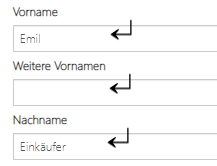
- Notes:
- There is a left-padding when wrapping readonly fields (static)
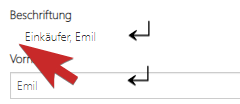
- There may be conflicts with other functions changing the width of fields, for example with
.inlinefunction
- There is a left-padding when wrapping readonly fields (static)
- NEW: Autofocus on page load.
Caution this one may not work in every browser and with every AppGini versiondv.getField("fieldname").autofocus();
- NEW: Autoselect text in input fields on focus
dv.getField("fieldname").autoselect();
- NEW: fix various number formats in input fields
dv.getField("fieldname").toNumber("de-DE", 2);new AppGiniFields(["field1", "field2", "..."]).toNumber("de-DE", 2);
- NEW Listen to checkbox-check in table view
Note: does NOT support check all/uncheck all, yetvar tv = AppGiniHelper.TV;
tv.onSelectionChanged(function (selection) { console.log(selection); });
2020/04
- fix: modified .toLeft() function for optimized table view rendering
- new: Invert navbar in User's Area
- new: Remove all links from table view cells
This may be useful in combination with addButtonOpen() - fix: adding file upload fields to tab if record is readonly
- new: Insert div's and insert span's next to fields
Same for: .insertAbove() | .insertBelow() | .insertBefore() | .insertAfter() | .insertPrepend() | .insertAppend() - new: var tabs = dv.getTabs(); shortcut function
- new: dv.getTabs().setPosition(TabPosition.Top);
position: TabPosition.Top | TabPosition.top | "top"
TabPosition.Bottom | TabPosition.bottom | "bottom" - new: (experimental) var id_field = new AppGiniDetailView().getField(fieldname);
shortcut function for quickly getting field handles - new: new AppGiniDetailView().getChildrenLinks().removeIcons();
- new: new AppGiniDetailView().getChildrenLinks().replaceIcons();
- new: (experimental / BETA) new AppGiniDetailView().autoCompleteOff();
- new: change login form
- new: fade in / fade out fields
- new: (unsupported, requires more testing and feedback) add keyboard shortcut function on allows to define keyboard shortcuts for focusing inputs
- new: optimize screen-usage by widening table view
- new: ready-callback now also available for AppGiniTableView:
- new: new AppGiniTableView().addOpenButton() function as a shortcut for new AppGiniTableView().addButton
This will add a button in the first column of table view which opens the record in detail view. - new: add icons to default lookup buttons
- new: change icon of lookup buttons (view parent / add new parent)
- new: (unsupported) onChange-Handler for lookup now additionally sends the fieldname to the callback
- new: change design of buttons next to lookup dropdowns
- new: design fix for image fields
- fix: small change in .inline() function when number of widths if different to number of fields
- new: (BETA) When following a link (eg from email) and you are not logged in, AppGini will redirect you to login page after 2 seconds. After logging in you will be redirected to index-page, not to the entry-page. This behaviour can be changed now
- new: (BETA) TableView: Merge identical cells (in column)
- new: (BETA) Tableview: Group rows
- new: addLayout(…).add(…, [ "#Headline" ])
- new: Automatically select text in quicksearch field for easy overwriting.
- new: (UNSUPPORTED) AutoComplete off for quicksearch This may not work in all browsers.
- fix: auto-showing formerly collapsed layout rows after being moved into tab
- new: new AppGiniCommon().fix().navbar();
- new: new AppGiniCommon().fix().dropdowns();
2019/11
- new (unsupported): turn top navbar to the left hand side (sidebar):
new AppGiniCommon().navbar.fix().toLeft( {true|false} );
parameter:true= also on homepagefalse= not on homepage (default) - new: Tabs in detail view:
new AppGiniDetailView().addTab("tab-name", "Title", "icon")
.add(["field1", "field2", "field3"]); - new: shortcut for (collapsible) layout-rows with variations:
new AppGiniDevailView().addLayout(widths[], title, canCollapse, isCollapsed, variation); - new: Link-Buttons in table view:
new AppGiniTableView().addLink("http://…", "icon", "text", Variation.default, "Confirmation prompt - Are you sure?"); - new: Buttons in table view:
new AppGiniTableVire().addButton(callback, "icon", "text", Variation.default); - new: get custom title of detail view.
After (!) you have usednew AppGiniDetailView().setTitle("…")once,
you can use.getTitle()to get the text-value (without html-formatting)var title = new AppGiniDetailView().getTitle(); - fix: .addGroup() name parameter / special characters will be replaced by "-"
- new: get name of current table in table view
var name = AppGiniTableView().getTableName(); - new: get name of current table in detail view
var name = AppGiniDetailView().getTableName(); - new: fix some ui for image fields since 5.8
new AppGiniField("imagefield").fix(); - new: layout rows are expandable now with title:
new AppGiniDetailView().addLayout([widths], "title", true|false, true|false, Variation.default)
2019/10
- new: tiny helper: get table name of field
var table = new AppGiniField("first_name").getTable(); - new: insert HTML elements above/below or before/after fields
new AppGiniField("birth_date").insertAbove().alert("Attention", Variation.warning); - new: expandable/collapsible panels in detail view
new AppGiniDetailView()
.addGroup("grp_history", "History", ["surgical_history", "obstetric_history"]); - new: replace navbar-icon by custom picture:
new AppGiniCommon().setImage("https://www.bizzworxx.de/agh32.png"); - new: Icons for ActionBarGroups
.addGroup("title", "icon"); - new: CSS-style for ActionBarGroups
.addGroup("title", "icon", "css-classname"); - new: Title of detail view form:
.setTitle("New Title"); - new: Title of detail view form:
.setTitleHtml("<b>New Title</b>"); - new: tiny helper: get the id of the current record
var id = new AppGiniDetailView().getSelectedId();
2019/09
- new: inline fields
- new: move link-buttons from top-right into the tabs (part of compact() function)
- new: count number of records and show badges in tabs (part of compact() function)
- new: placeholders: new AppGiniField(“tiny_uint”).placeholder(“0…255”);
- new: AppGiniField(“…”).prepend(“text”, “iconname”);
- new: AppGiniField(“…”).prependIcon(“name”);
- new: AppGiniField(“…”).prepend(“text”);
- new: AppGiniField(“…”).append(“text”, “iconname”);
- new: AppGiniField(“…”).appendIcon(“name”);
- new: AppGiniField(“…”).append(“text”);
- fix: floating action buttons
- new: dv / expand() method to widen children tabs
- new: dv / compact() method to shrink buttons down and expand space for data
- new: dv / hideText of action buttons
- new: dv / change size of action buttons
- new: dv / change width of action button container
- fix: move radio buttons
- fix: adjust width of richtext (html) areas
- new resizeLabels()
- new: wrapLabels()
- dv: links below action buttons
- dv: buttons (executing javascript functions) below action buttons
- dv: variations for links and buttons
- navbar: invert navbar
- navbar: align and fix Admin-area
- navbar: align and fix Logout-button
2019/08
- dv: hide field
- dv: hide fields
- dv: change label
- dv: hide label
- dv: multi-column-layout
- dv: headers for multi-column-layout
- dv: dividers for multi-column-layout
- dv: append add-on for inputs
- dv: change or remove navbar icon (brand)
- dv: change navbar title (brand)
- initial release
Do you like it?
We can only get better if you give us constructive suggestions for improvement. Just voting "No" without giving reasons or suggestions is not helpful and cannot lead to changes.
If you have been searching for a completely different solution than the subject says, this article can not be and will not be helpful for you. In these cases you should consider not to vote.
This is website feedback, only. This voting is not a support form nor ticket system.